

Merced Community College MobileID

Welcome to Your New School MobileID
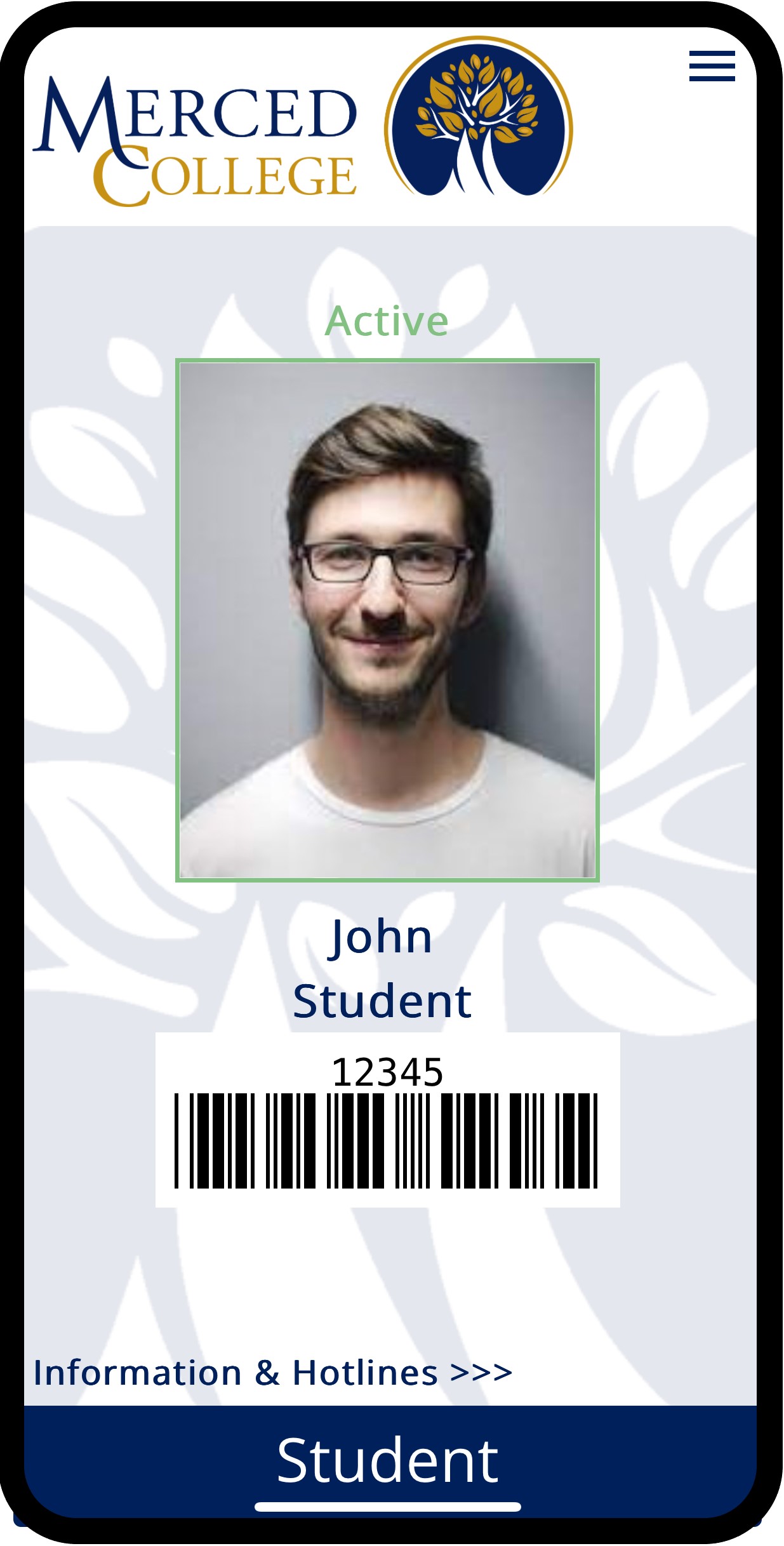
It works as a Student ID Card right on your phone.

Use it the same as your physical ID. Don't worry about losing your badge, only about losing your phone and you're not going to let that happen!

Get alerts on your Mobile ID about school closures, holidays, etc.

Your Mobile ID stays active as long as you are an active student.

Access Public Transit - Use your MobileID to ride. Your pass remains active while you are an ACTIVE STUDENT.

Use your MobileID anywhere on campus you currently use your Student ID card.
Set up your Mobile ID
- Go to Mobile ID Portal in your browser
- Click on the Login Button and enter your school information.
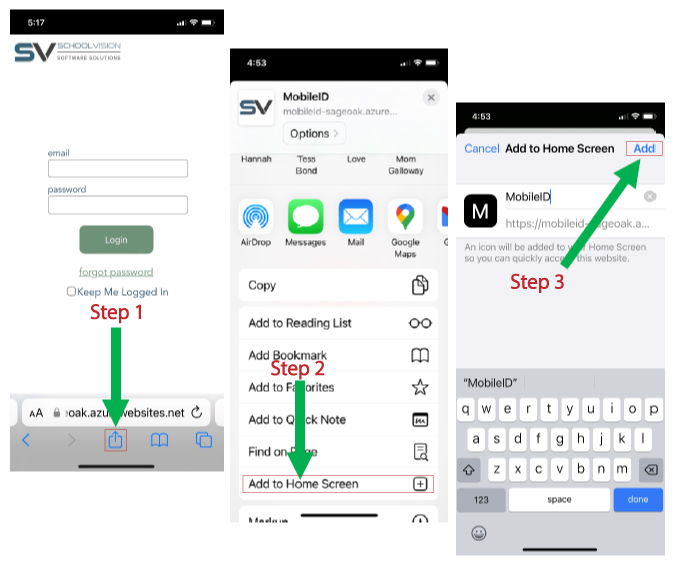
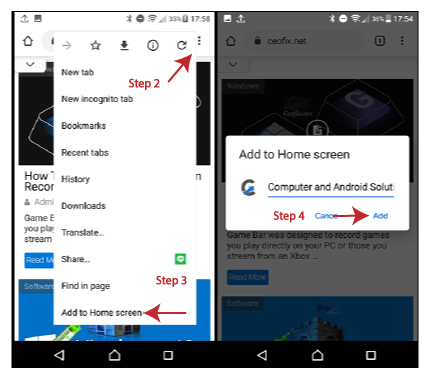
- Save it to your home screen for easy access.
- For iPhone users, click on iPhone Instruction
- For Android and Google Pixel users, click on Android Instruction
Frequently Asked Questions
-
Q: What if I can't log into my MobileID? +
A: Double-check your email address to make sure you are entering it correctly. Note that it may take up to 30 minutes to be active if you recently enrolled in school. Contact Admissions and Records if you are still having trouble.
-
Q: How can I add or update the picture on my Mobile ID? +
A: Visit Admissions and Records (https://www.mccd.edu/enroll-at-merced-college/admissions-records/forms/) to add or update your photo on both your physical ID and/or Mobile ID.
-
Q: What if my name has changed? +
A: Visit Admissions and Records (https://www.mccd.edu/enroll-at-merced-college/admissions-records/forms/) to submit a name change.
-
Q: Can I use my Mobile ID to ride the bus if my Mobile ID shows “Inactive”? +
A: No, “Inactive” means you are no longer enrolled and will prevent you from riding the bus unless your Mobile ID displays “Bus Only”. See next Q&A for details.
-
Q: What if I drop classes after the refund deadline? +
A: Students that drop after the refund deadline are not refunded the transportation fee. Your Mobile ID will flash as Bus Only and you'll still be able to use The BUS transportation in this case.
-
Q: Why does it show me as an Inactive student when I am still enrolled? +
A: Speak with the school administration about your school status. Once that is fixed, your Mobile ID will show you as Active again.
-
Q: I took a semester off. Will my login still work? +
A: Yes, your login will work but will show you as an Inactive Student until you enroll for a new semester. Your Inactive MobileID will not work to ride the bus or access places on campus.
-
Q: Do I still have to carry a Physical ID if I have the Mobile ID? +
A: This may depend on your role at the school. Regular staff, for credit or noncredit students only need one or the other. However, medical or police-related roles may require a physical id. Please check with the Admissions and Records Office.
-
Q: Do I need to be connected to wi-fi to use my MobileID? +
A: You'll need to be connected to Either wi-fi Or cell service to use your MobileID.
-
Q: What if I am still having trouble? +
A: Contact us at support@schoolvision.net